TrialsNest
Sign Up
One connected recruiting journey

From trial search to a clear next step.

Patients can understand what happens after they share interest. Research teams can see the signal, owner, blocker, and next action without rebuilding the story from separate tools.

Patient path
Know who reviews next
Fictional example
Study interestReceived
Current statusResearch-team review
Next updateCoordinator follow-up
Research-site handoff

Review the inquiry and choose the next operational action.

What happens next

Five stages. No mystery about the handoff.

The same journey looks different to the patient and the research team, but responsibility stays clear at every stage.

01

Search

Explore studies and compare public details without treating interest as enrollment.

02

Share interest

Choose a study and send structured information for research-team review.

03

Review

An authorized study team reviews possible fit and any open questions.

04

Follow up

The coordinator contacts the patient, requests clarification, or records a next action.

05

Next step

Scheduling, outstanding items, or a documented close reason stays visible.

Choose your path

See the journey as a patient or a research team.

Switch perspectives to see what each person can do, what they are waiting on, and what the next role receives. Every row is a fictional example.

Choose a perspective
Stage 01Patient interest
01 - Patient interest

Share interest without treating it as enrollment.

The patient chooses a study, reviews the public details, and decides whether to share information for study-team review.

Current signal
New study inquiry
Owner
Intake queue
Blocking condition
Contact preference not confirmed
Next action
Review the submitted study interest
Example patient view
Fictional example
Study
Research Study Example Beta
Status
Ready to review
Your choice
Continue or save for later
What the next role receives

A structured inquiry enters the coordinator queue.

Stage 02Guided prescreen
02 - Guided prescreen

Answer focused questions and review what was captured.

Prescreening helps the study team understand possible fit. It does not determine final eligibility or enrollment.

Current signal
Prescreen submitted
Owner
Coordinator review
Blocking condition
One answer needs clarification
Next action
Review answers against the study workflow
Example patient view
Fictional example
Progress
Prescreen submitted
Meaning
Possible fit needs review
Next reviewer
Authorized study team
What the next role receives

The study team receives organized answers for review.

Stage 03Site review
03 - Site review

Know who reviews next and what you can do now.

The patient can see that the study team is reviewing the inquiry without being told that eligibility or enrollment is final.

Current signal
Review in progress
Owner
Assigned coordinator
Blocking condition
Study-team question remains open
Next action
Confirm whether outreach should continue
Example patient status
Fictional example
Status
Study-team review
Who reviews
Research site
Your next step
Wait for an update
What the next role receives

The reviewed inquiry moves to follow-up, records, or a documented close reason.

Stage 04Records and readiness
04 - Records and readiness

See what was requested without guessing what comes next.

When the site requests an item, the patient can see the request status and the next available action in the patient workspace.

Current signal
Readiness check open
Owner
Site operations
Blocking condition
Requested item is still pending
Next action
Follow up on the outstanding request
Example patient request
Fictional example
Request
One item requested
Status
Waiting for upload
Next action
Review the request
What the next role receives

The site can see whether the inquiry is ready to move toward scheduling.

Stage 05Visit scheduling
05 - Visit scheduling

See when the study team is ready to discuss a visit.

The patient receives the next scheduling request only after the site has chosen to move the inquiry forward.

Current signal
Ready for scheduling outreach
Owner
Coordinator
Blocking condition
Availability not confirmed
Next action
Offer the next appropriate scheduling step
Example patient status
Fictional example
Status
Scheduling outreach
Requested action
Review available times
Enrollment
Not yet determined
What the next role receives

The patient and site receive a clear scheduling status.

Research-site path

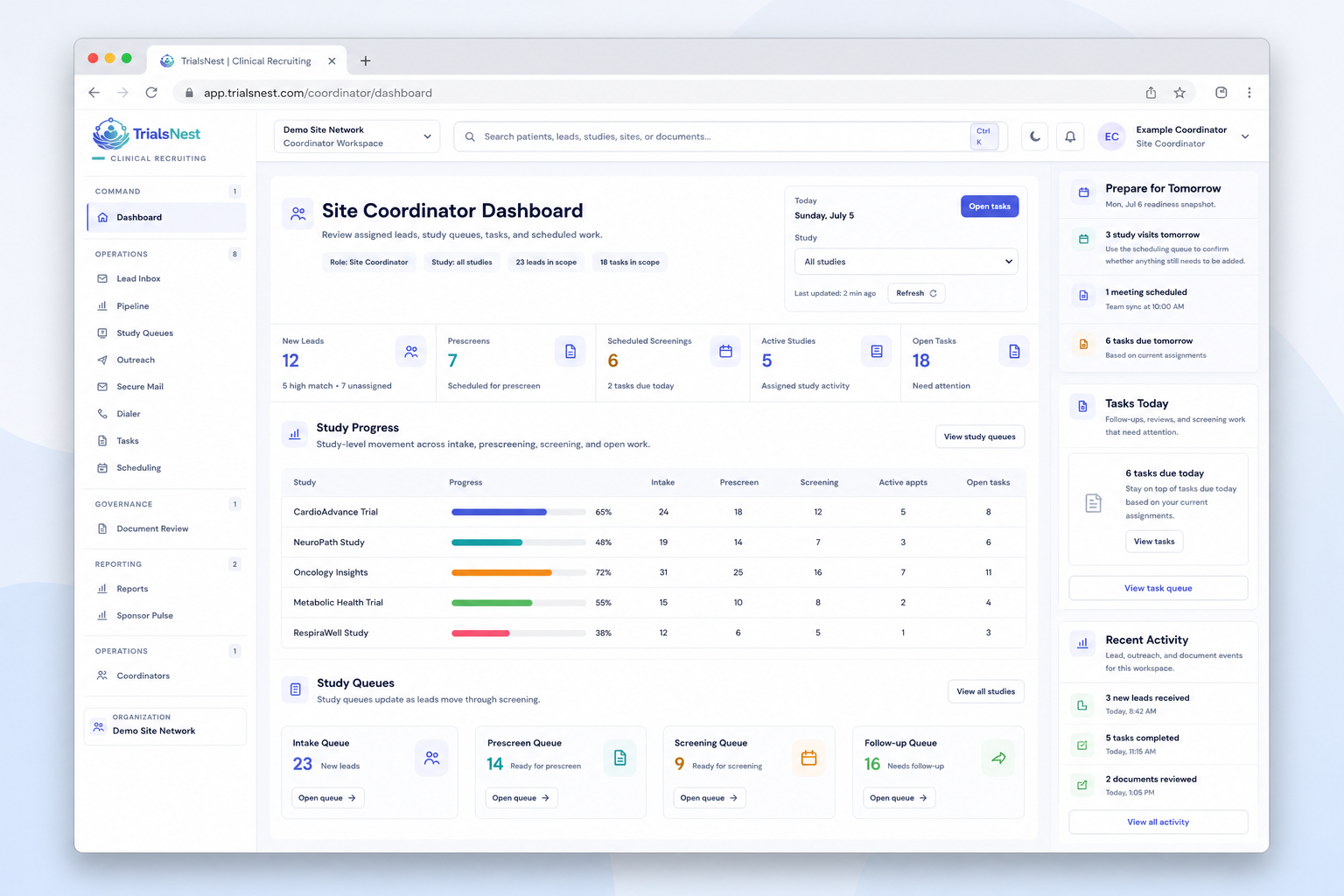
The coordinator sees work—not just another status.

New interest, clarification needs, outstanding items, follow-up, and scheduling readiness stay connected to the person responsible for moving the inquiry forward.
  • Ownership and due work stay visible
  • Blockers remain attached to the inquiry
  • Patient updates stay careful and truthful
  • Sponsor reporting stays aggregate
Explore the site workflow
TrialsNest site coordinator dashboard showing the current coordinator workspace, study progress table, queues, and right rail.
Clear responsibility

Helpful software should clarify decisions, not blur them.

TrialsNest organizes recruiting information and next actions. Authorized research teams remain responsible for clinical review, eligibility, and enrollment decisions.

What patients can do

  • Explore public study information
  • Share interest and prescreen details
  • Review requests and status updates

What research teams do

  • Review possible-fit information
  • Confirm questions and follow-up
  • Determine eligibility and enrollment

What sponsors receive

  • Aggregate study and site movement
  • Operational blocker categories
  • No patient-level workspace access
Choose the path that fits

Explore studies now—or see the research-team workflow in context.

Patients can search privately. Research teams can book a focused walkthrough built around their recruiting process.