
The TrialsNest website is organized around study discovery, patient education, site and sponsor workflows, public resources, trust pages, and support paths.
In this guide
Key points
Start with the path that matches your role
Patients can begin with Find Trials, condition pages, or the For Patients page to understand study discovery, prescreening, and what happens after applying.
Research sites can use the For Sites page, site recruitment workflow resources, and clinical trial recruitment software guides to understand how TrialsNest supports intake, follow-up, records readiness, scheduling, and reporting.
Sponsors and CRO teams can use the For Sponsors page, Sponsor Pulse pages, and sponsor reporting resources to review aggregate visibility, source quality, site blockers, and next-action reporting.
Use practical guides for deeper context
The resources area collects patient education, site workflow guides, sponsor reporting examples, software comparison pages, templates, and trust-related links.
Resource articles are written to explain how clinical recruiting workflows work in practice. They are educational and operational, not medical advice or final eligibility guidance.
Readers can move from broad guides to focused checklists, examples, and comparison pages without losing the main website context. That helps patients, sites, and sponsors find the right next step instead of landing on an isolated article with no clear path forward.
Review trust and communications pages before sharing information
Visitors can review the Trust Center, Privacy Policy, HIPAA Notice, SMS Terms, Email Communications Policy, AI Disclosure, Accessibility Statement, and other public policies before continuing.
TrialsNest public pages are designed to explain boundaries clearly. Final clinical trial eligibility, screening, and enrollment decisions stay with authorized research sites and study teams.
For patients, those pages help explain privacy, communications, consent-adjacent boundaries, and the difference between expressing interest and receiving a study-team decision. For sites and sponsors, they show how TrialsNest separates public education from protected workflow operations.
Follow source-specific paths from public pages
Visitors often arrive from different intents: a patient looking for studies, a coordinator comparing intake workflows, a sponsor checking reporting visibility, or an operations lead reviewing software options. The website is structured so each path can continue into a relevant public page before a form is needed.
That matters for search and usability because a visitor should not need to guess whether they are in the patient, site, sponsor, or resource area. Clear internal paths also help search engines understand how the public pages relate to each other.
Contact or request a walkthrough
People who need help can use Contact, Help, FAQ, or Request Demo depending on whether they are asking about a study, a site workflow, sponsor reporting, privacy, security, or partnerships.
Public forms should be used for general support and walkthrough requests. Sensitive study details should stay in the appropriate secure workflow.
If a question is study-specific, the safest path is the relevant study or patient workspace flow. If the question is about operational fit, a walkthrough request can focus on source tracking, coordinator ownership, blocker review, reporting, and the handoff between public interest and protected follow-up.
A queue-level example
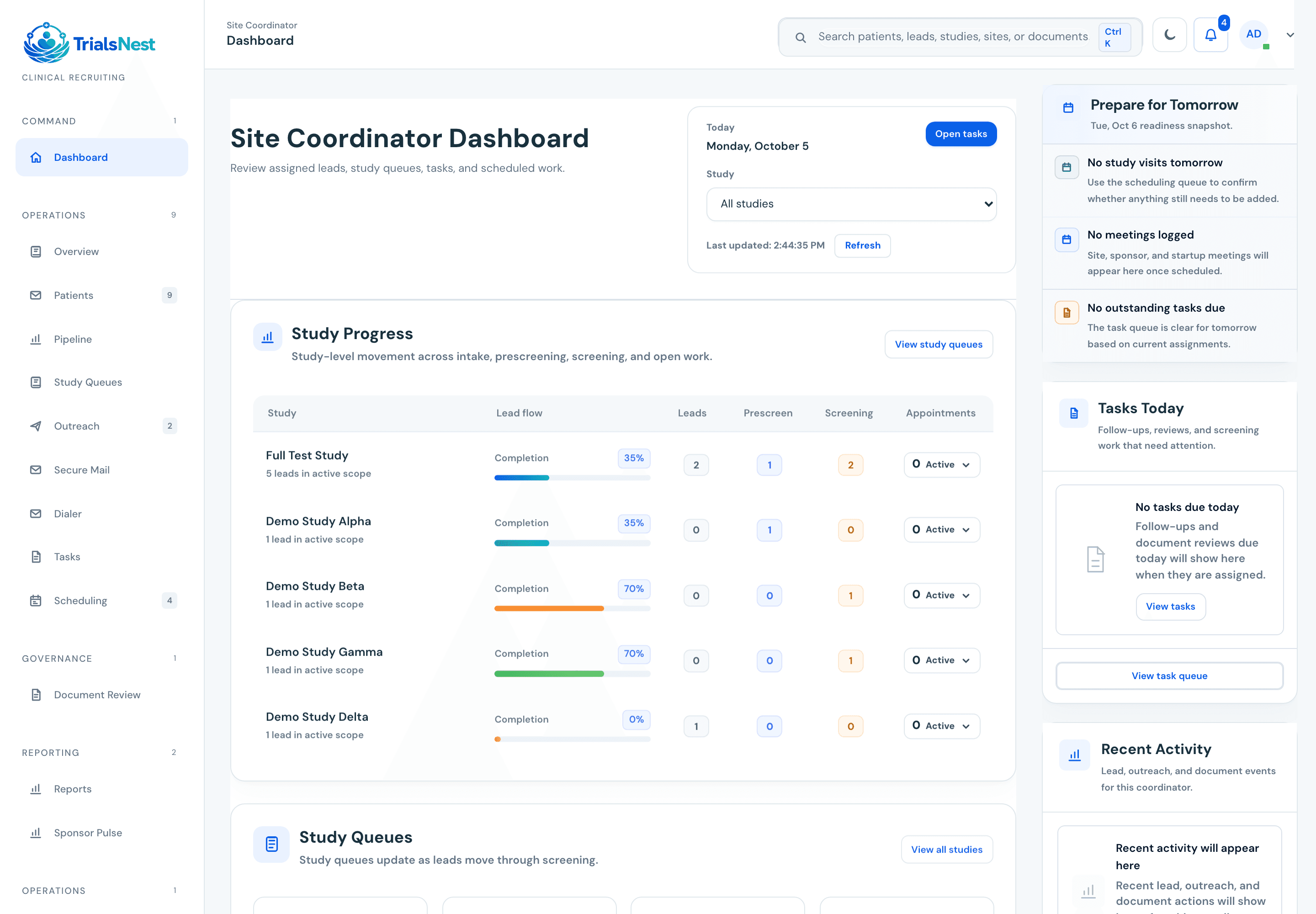
A coordinator opens the queue and can immediately see which lead needs follow-up, which one is waiting on records, and which one is ready for scheduling review.
Operator's note
Use TrialsNest website guide beside the real workflow. The page is strongest when it helps a team name the owner, blocker, source-quality issue, records gap, scheduling constraint, or sponsor update that needs attention.
Treating the guide as a static document
The operational value appears when the guidance changes a queue, meeting agenda, dashboard, or handoff.
Adding detail without ownership
More fields do not help if nobody owns the next action or review point.
Checklists and questions for your team
Decision checklist
Can the next action be found without searching notes, inboxes, or spreadsheet tabs?
Does the workflow create a natural weekly or daily review point?
Can the operating record become a clean update without manual reconstruction?
Before you start
Questions for your team
Ways to use this guide
Compare it with the real queue
Read it next to the way your team already works. The gaps usually show up around ownership, missing records, follow-up timing, or sponsor-update prep.
Mark the handoffs
For each section, ask where the work changes hands. If the handoff depends on memory, a spreadsheet tab, or a buried message, that is probably worth fixing.
Leave with one operating change
The guide should point to one next status, owner, report field, review cadence, or patient-facing boundary that gets clearer.
Common questions
What should teams know about TrialsNest website guide?
The TrialsNest website is organized around study discovery, patient education, site and sponsor workflows, public resources, trust pages, and support paths. The practical value is in connecting the concept to ownership, follow-up, records readiness, scheduling, reporting, and clear next actions.
Who is this resource written for?
This resource is written for clinical operations sorting through practical questions around TrialsNest website guide and the workflow decisions that usually come with it.
Does this guide replace study-team review or medical advice?
No. TrialsNest resources are educational and operational. They do not provide medical advice, diagnosis, treatment, emergency care, or final clinical trial eligibility decisions.
How would a team use this workflow guidance in practice?
Use it to compare the current workflow with what actually happens day to day: where leads wait, where records get lost, where follow-up slows down, and what needs a clearer owner. The best next step is to turn the article takeaways into a short review checklist for TrialsNest website guide.
Sources and editorial notes
Published . Reviewed by TrialsNest editorial review on .
This guide explains recruitment work and questions to discuss with your team.
This information is educational. Your study team makes medical, eligibility, and enrollment decisions.
TrialsNest can organize intake, prescreening, and workflow context, but it does not make final eligibility, enrollment, treatment, or medical decisions.
Sponsor-ready updates should show source quality, movement, blockers, and next actions without becoming a broad patient-detail workspace.
These resources explain clinical recruiting workflows and buying decisions. Sensitive study details belong in the appropriate secure workflow.
See TrialsNest in action
Bring this workflow into one place.
Manage inquiries, follow-ups, records, and visits. Keep sponsors updated on progress.
Keep reading
Clinical trial recruitment CRM vs CTMS: what sites should compare
Compare a clinical trial recruitment CRM vs a CTMS for site workflows, prescreening, records readiness, scheduling, and sponsor reporting.
Clinical trial recruitment software for multi-site studies
A guide to recruitment software for multi-site studies, covering shared workflow standards, local queues, source quality, scheduling, and reporting.
Clinical trial recruitment software resources
Resources for teams comparing clinical trial recruitment software, patient recruitment software, dashboards, workflow coverage, implementation plans, and ROI.
Clinical trial recruitment software RFP library
A recruitment software RFP should ask vendors to prove how their platform handles patient interest, prescreening boundaries, coordinator ownership, records readiness, source quality, dashboards, sponsor reporting, implementation, access, and healthcare data boundaries.